NewsRelease 022
Release 022 · VEX 0.4.2
AI, paid in VEX. No API key.
Until now, running the agent meant bringing your own OpenRouter key and a card on file somewhere else.
0.4.2 adds Vex Inference: the agent's models, paid from a VEX balance. You sign in with the wallets already in VEX, deposit VEX from the app, and the agent runs on that balance. No key to paste, no second account to top up.
Your OpenRouter key still works exactly as before. Vex Inference is a choice, not a switch we flip for you.
This release covers the work merged after 0.4.1. 15 commits · Vex Inference · Deposits, withdrawals and cashback in the app · New database tables, added on first launch
01 · Vex Inference
Pick it, sign in, go.
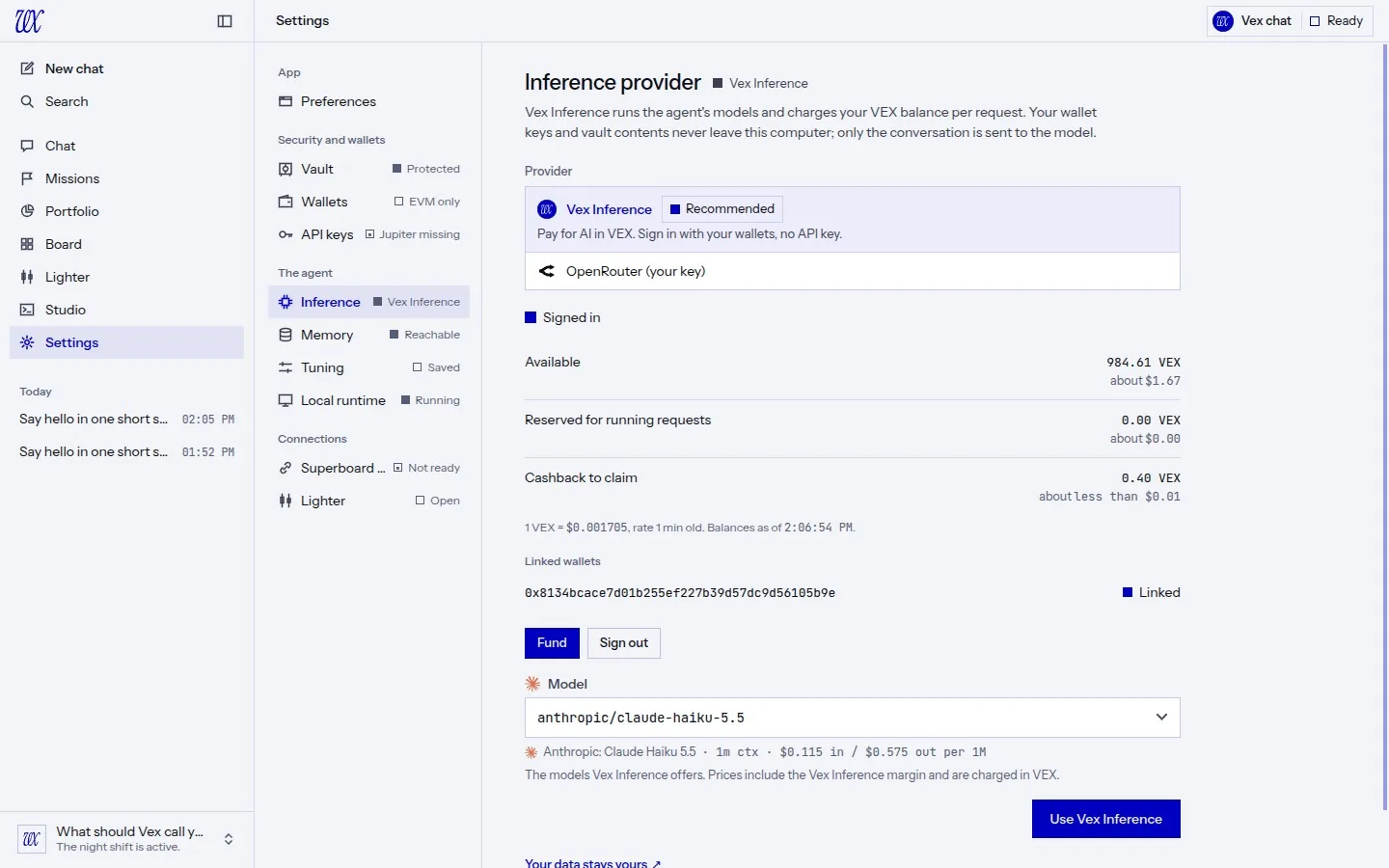
- Listed first. In the setup wizard and in Settings, Vex Inference sits at the top, marked Recommended, with OpenRouter (your key) right below it. It is picked for you only when no provider is set up yet. Already on OpenRouter? Nothing changes until you choose.
- A hello on the welcome page. "AI is now paid in VEX" appears under the greeting, with Use Vex Inference or Not now. Not now means gone for good.
- Your wallets are the sign-in. No API key. VEX signs one standard sign-in message (EIP-4361) with each EVM wallet in the app. Your vault needs to be unlocked. Have more wallets? Link them to the same account from Settings.
- Signed for the right host only. The sign-in message must name inference.projectvex.ai, the host the app actually talks to. A server asking VEX to sign for anything else gets a refusal, not a signature.
- Stays yours. Your session is kept in your vault. Sign out removes it. Your wallet keys and vault contents never leave this computer; only the conversation is sent to the model.
- The model list, priced. Pick a model from the Vex Inference list. Each one shows its price per million tokens, input and output, written out exactly. Prices include the 15% VEX share and are charged in VEX.
02 · Deposit
VEX in, from the app.
- One transfer. Pick a linked wallet and an amount. VEX sends that VEX on Robinhood Chain to the Vex Inference deposit address. The transfer pays a small network fee in ETH on Robinhood Chain.
- The address is built in. The deposit address ships inside the app. It does not come from a setting, the server or the agent. Before anything is signed, VEX checks that Vex Inference reports the same address. If they differ, nothing is sent.
- Review, then sign. The form ends in an approval card: the amount, the sending wallet, the destination, the network fee bound and when the approval expires. Every one of them is checked again right before signing.
- Use it right away. As soon as Vex Inference sees your deposit, up to $25 of it is usable for AI at once as provisional credit. The rest follows when the deposit is final on Robinhood Chain, in about 16 minutes. The balance shows it on its own row, Deposit credit, not final yet: usable for AI now.
- Withdrawable once final. Provisional credit pays for requests, but only final deposits can be withdrawn.
- Only from linked wallets. A wallet that is not linked to your account is shown, greyed out, with how to link it. A deposit from it could not be credited to you, so VEX does not let you send one.
- Unclear answer? It waits. If the network leaves the outcome unclear, the deposit stays pending and is never sent twice. Vex Inference credits what it sees on chain.
03 · What a request costs
Held first, charged what it cost.
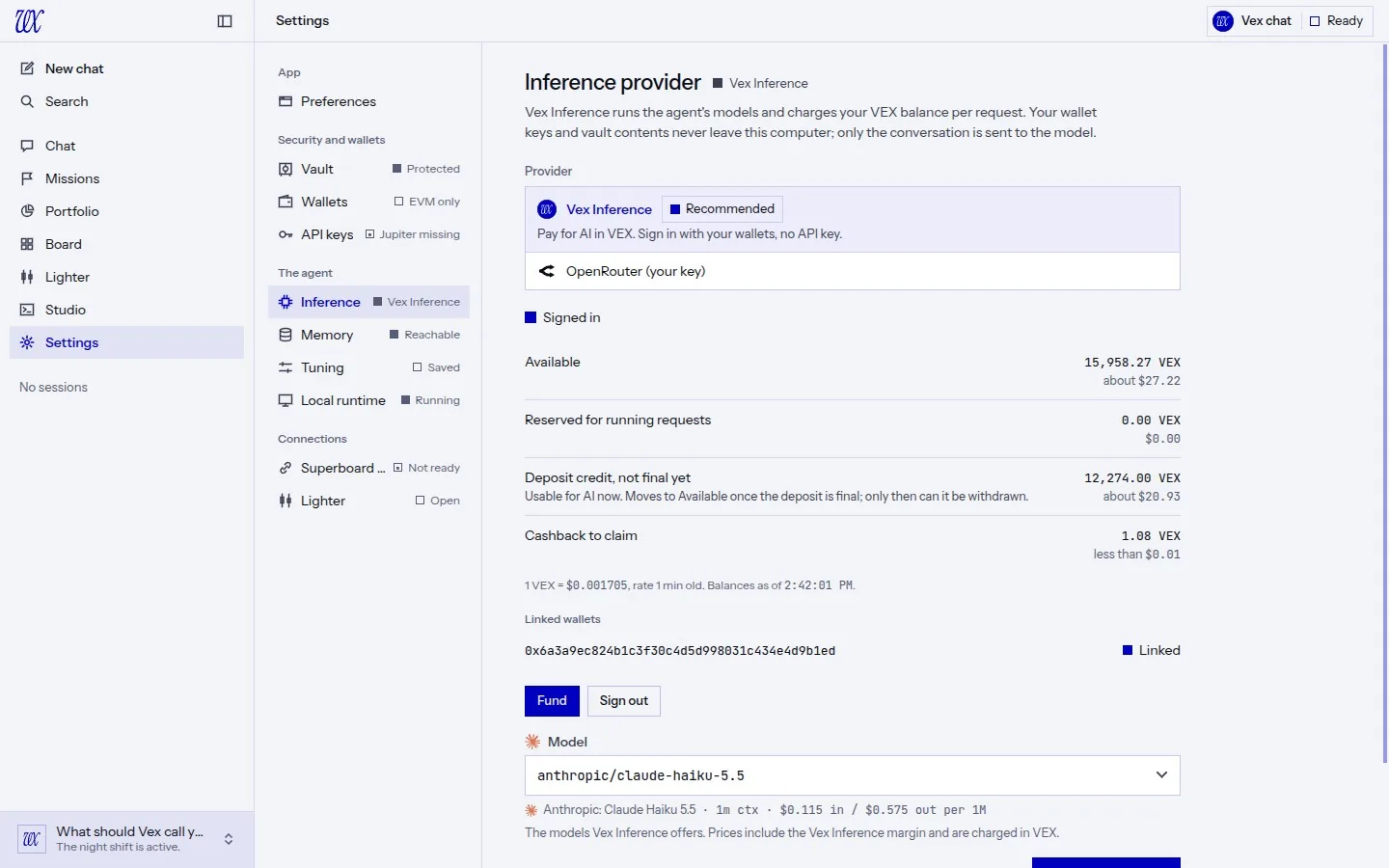
- Held, not guessed. Each request holds its worst-case cost from your balance while it runs. You see it as Reserved for running requests.
- Charged what the provider billed. When the request finishes, you pay what the model provider billed for it, plus the 15% VEX share. The rest of the hold goes straight back to Available.
- Priced at a 60-minute average. VEX is converted at its 60-minute average price on Robinhood Chain, not at a single trade. If a fair price can't be established, VEX says so instead of guessing, and actions that need a price wait.
- One rate line. The account shows "1 VEX = $..." once, with how old that rate is.
- A low balance lowers the limit, out loud. If your balance can't cover a full answer, Vex Inference lowers the answer limit and the turn tells you, with the reason.
- Plain errors. Balance too low, session expired, account paused for review, service unavailable: each one says what happened and what to do next.
- 3% back. 3% of the model cost of your requests comes back as cashback. Claim it to your balance from the Cashback tab.
04 · Withdraw
Out, with a safety delay you can stop.
- Only to your own wallets. A withdrawal goes only to a wallet that is linked to your Vex Inference account and is in this app.
- A 12-hour safety delay. Every withdrawal waits 12 hours before it is sent. The approval card states the delay Vex Inference reports and the time it releases.
- Cancel until then. A cooling withdrawal reads "Cooling, releases at HH:MM" with a Cancel key. Cancel it and the VEX returns to your balance.
- Not you? You'll know. If a withdrawal shows up on your account that this app did not start, VEX tells you once: on the funding page, in Settings, in Needs you and in your current session, with Cancel and It was me.
- Never sent twice. If an answer is unclear, VEX keeps the request and Check status asks again with the same key. It cannot pay out twice.
- The daily limit, shown. The approval card shows how much of your daily withdrawal limit is left.
05 · The agent and your balance
It can check. It can top up, with your say.
- The agent sees the balance. When Vex Inference is your provider, the agent can read your balances, the rate, the current model's prices in USD and VEX, recent usage and any pending withdrawal.
- Deposits go through you. The agent can propose a deposit. It sets the amount and nothing else: the destination, the token, the chain and the fee are refused by name. You approve it on a card, as with any other transfer.
- No withdrawals. The agent has no tool to withdraw or to cancel a withdrawal.
06 · Auto top-up
A rule you write once.
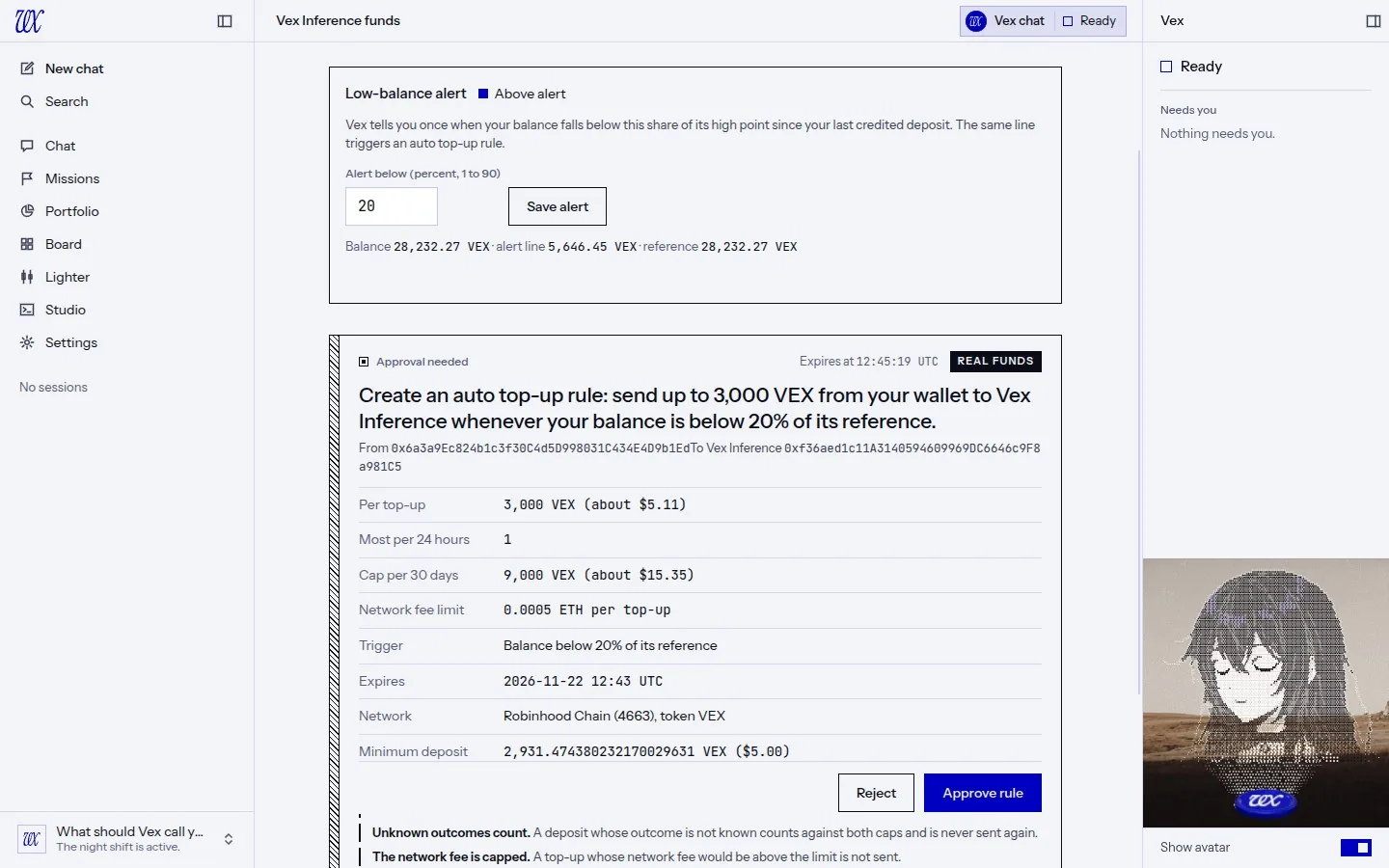
- You set the bounds. Source wallet, amount per top-up, most per 24 hours, a cap per 30 days, a network fee limit per top-up and an expiry. The rule exists only once you approve it on its card.
- Within the rule, no card each time. Top-ups inside those bounds are signed without asking each time. The agent may use the rule too, but it can never create or widen one.
- Counted honestly. A top-up whose outcome is unclear counts against both caps and is never sent again. A top-up whose network fee would go over your limit is not sent.
- Pause, resume, revoke. Each is its own approval, and Pause and Revoke work even while Vex Inference can't be reached.
- Low-balance alert. Set a percent and VEX tells you once when your balance drops below it, on the turn and on the funding page.
07 · One Inference tab
Settings, simplified.
- One place. Settings now has one Inference tab instead of a Model tab and a separate Vex Inference one. It shows the provider choice and the chosen provider's panel.
- Look before you switch. On OpenRouter, you can still open the Vex Inference card, see balances and fund it, without switching until you press Use Vex Inference.
- Funding, in one page. Deposit, Withdraw, Cashback, Auto top-up and History, side by side.
08 · Which provider, at a glance
Marks that mean something.
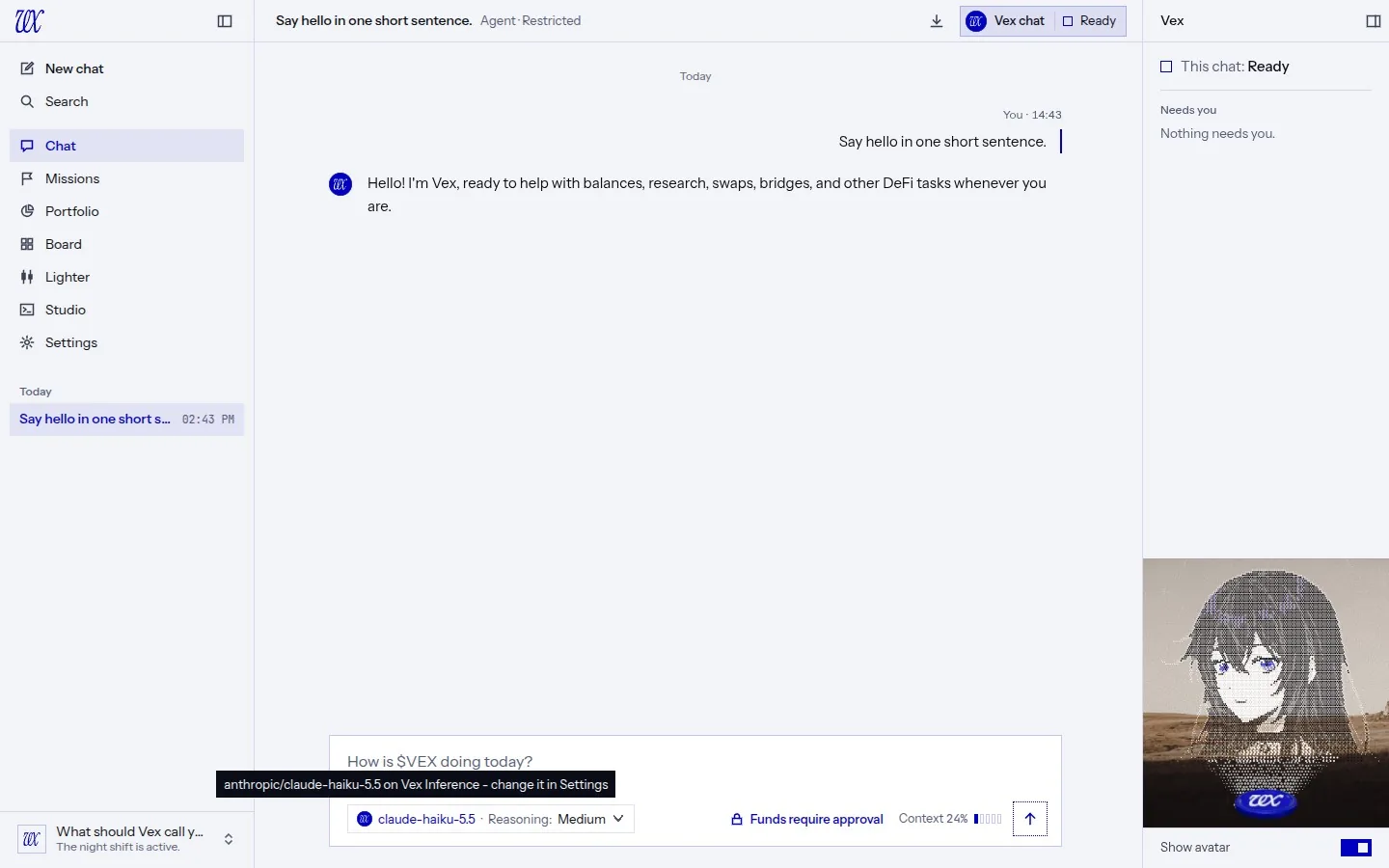
- In the composer. The model key now starts with the mark of the provider serving it: the flat vx disc for Vex Inference, OpenRouter's own mark for OpenRouter. The tooltip and screen readers say the provider in words.
- Model marks that show up. Model brand marks are drawn in one ink that follows the theme. The OpenAI mark no longer disappears on light paper, and Grok carries the xAI mark.
09 · Before you update
What to know.
On OpenRouter? Your key, your model and your settings carry over untouched. You'll see the Vex Inference notice on the welcome page until you dismiss it.
Want Vex Inference? You need an EVM wallet in VEX, an unlocked vault, VEX on Robinhood Chain and a little ETH there for the network fee.
New database tables. This release adds five tables for Vex Inference: its settings, the low-balance watch, auto top-up rules, the auto top-up runs, and the record of withdrawals this app started. They are created on first launch. Nothing existing is changed or removed.
Everything else carries over. Sessions, missions, memory, wallets and settings.
10 · Fixes
Little things, fixed.
Models
- Model prices are shown exactly as the catalogue states them, never rounded through floating point. The old display understated some prices.
Security
- The OpenRouter client is pinned to openrouter.ai. An
OPENROUTER_BASE_URLset on your machine can no longer send your key to another host. - Dependency updates clear published advisories: follow-redirects 1.16.1 and the MCP SDK 2.3.1. None of the affected paths was reachable from VEX.